The Whys
During my time working as a SDE in the Data & AI team at Vegapay, we performed a detailed funnel analysis of one of our card onboarding journeys. During the analysis we found out several steps where the users were dropping off due to either friction or clarity. This meant that there was a clear requirement of assisting users with their onboarding much like how a real support agent could and help resolve user queries on the fly.
However, using actual human support agents is a logistics and user experience nightmare. Not all questions need to be answered by humans and the user cannot be expected to be on call all the time while he is filling out his application. With the rise of conversational AI SDKs and Agents like Eleven Labs, there existed a tech solution that could really elevate user experience and help us reduce customer dropoffs.
Eleven Labs, already offered paid SDKs and voice conversational Agents that can be integrated out of the box, however keeping in mind the costs and customer data privacy we decided to go with a in-house developed version that allowed us to keep all of our data on-prem and allowed flexibility in terms of features.
The Whats
The idea was simple, develop a multi-modal (voice and chat) AI assistant that could RAG over our onboarding knowledge base and leverage this context to dynamically answer user queries. While it wasn’t possible for me to completely replicate the standards of Eleven Lab offered solutions, We did have a clear set of objectives that this project needed to accomplish in order to be deemed a success.
- Respond to User queries using the onboarding journey knowledge base as a strict source of information.
- Offer interactions through both speech and text.
- Handle real-time user interruptions gracefully.
- Be capable of understanding pauses and tones.
- Maintains contextual continuity during a session.
- Responds in an acceptable latency.
The Hows - AKA The System Architecture
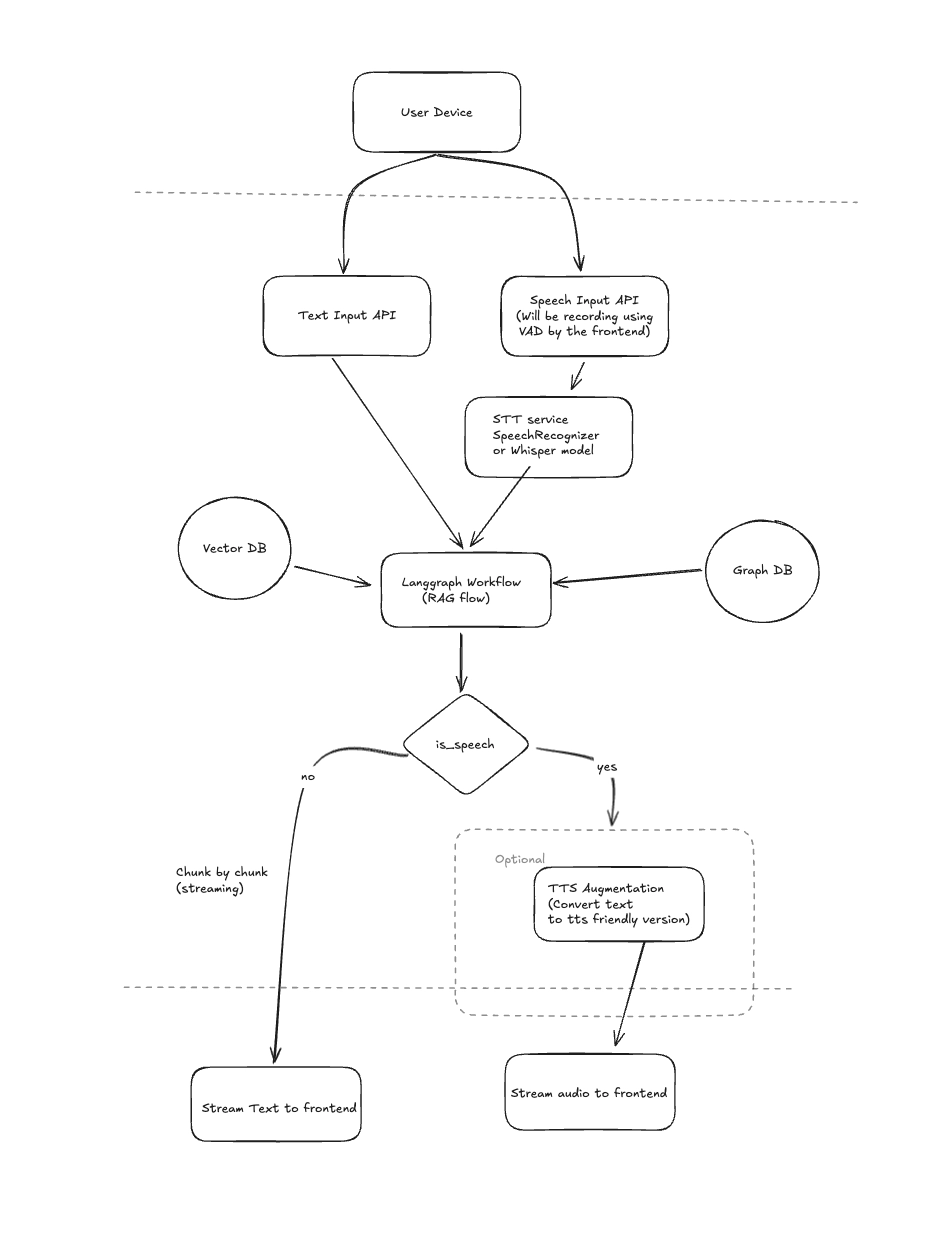
Building a knowledge base
The first and foremost step of building any system like this was to formulate a strategy of building the knowledge base based on our onboarding journey. Since our onboarding process is a deterministic flow, we decided to have a pre-defined template of each and every screen where we would store:
- Screen/Step Name
- What the user sees
- What the user can do
- Expected outcome
- Unexpected outcome
- Screen/Step FAQs
This allowed me to give my LLMs context about each and every screen without having to rely on VL models or Images.
Chunking & Retrieval Strategy - Vector DBs v/s Graph DBs
In case of RAGs, how you store your data and how you retrieve your data is fundamental to how the LLMs interpret them.
My first hunch was to use graph DBs like Neo4J to create knowledge graphs out of our onboarding journey context. Knowledge graphs can help improve search relevance by accounting for the relationships between data-points, this allows us to enable multi-hop reasoning which is something that is not present in standard semantic search solutions. However while this approach did allows us to have an enhanced contextual understanding of the knowledge base, this completely killed the responsiveness of our assistant. Querying the Graph DB meant we had to have an extra agent solely responsible for generating Graph DB queries, this meant an extra LLM call and combining this with Multi-hop strategy it meant our assistant was painfully slow.
Prioritizing responsiveness over enhanced reasoning, We elected to go with a plain old Semantic Search approach. While vector DBs do not store inherent relationships between data points, they are amazingly fast at processing and querying large datasets. This fact combined with the fact that our knowledge base didn’t exactly require the advanced reasoning capability that knowledge graphs offered, we chunked our knowledge base in a json format based on the aformentioned template and stored them in our Vector DB.
Making the Agent listen
Having figured out the Retrieval and Augmentation parts of the RAG, it was time to focus on the Generation aspect. However before we could RAG over our knowledge base, we had to parse the user voice input into a RAG-able query.
This meant 2 things:
- We had to detect when the user was actually speaking, this meant applying noise compression and other required clean-ups. Recording and streaming all user audio is a very silly idea as it could easily overwhelm our system and is in general a waste of resources.
- We had to parse what the user was speaking, this meant using an Audio to Text model.
To solve #1, We decided to go with an approach called VAD (Voice Activity Detection) on the client side using silero-vad. This library already implements all the required required speech detection and audio clean-up/compression functionaltiy that was required for my use case. This allowed me to only stream audio when required to my underlying backend agent.
Solving #2 was even easier using OpenAI’s whisper model. Whisper allowed me to convert my detected speech audio to text while being fast and accurate.
Having solved both of these problems, my system was still doing pretty good latency wise.
Making the Agent talk
Now that our Agent had the capability to listen and generate relevant answers based on the available context. The next step was to make it talk. Being constrained on resources and latency We found a really good TTS model called Kokoro-TTS that had support for custom pronounciation, intonation and stress levels in its speech. Being only a 82M parameter model it was blazing fast for my use case, also it supported streaming audio. This meant We would save time by streaming and playing audio chunks on the frontend as they’re being generated on the backend. This was a huge win on the latency part!
Handling Interruptions
Our agent could now listen and talk with good intonation and response times! But the final frontier of making it more human-like was to add the ability to make our agent handle interruptions gracefully. In real life conversations, humans have the ability to process interruptions, drop the current conversation thread and move onto the next one. This is precisely what our Agent needed to make it more human like.
To implement the idea was simple and as follows:
- All the interfacing to the client would be done via WebSockets since we’re solving a bi-directional real-time problem.
- We will initialize a user session once a websocket connection is made.
- Each Session’s responsibility would be to manage the STT -> RAG -> TTS langgraph process’ lifecycle using python’s Asyncio library. This meant each langgraph process would be one Asyncio Task.
- When a user interruption was detected on the frontend, the frontend would first stop the TTS audio, clear the audio buffer and send an interrupt event to the backend. Following this, the new speech detected audio is sent to the backend.
- Upon recieving the interrupt event, the Session Manager would send a Cancellation Event to the asyncio Task in process, which would stop the current LangGraph process. This now allowed the Session Manager to pick-up the new input and spawn a new asyncio Task for the same.
This approach allowed us to gracefully handle user interruptions and made our Agent more human like.
What we achieved + Future Scope
By the end of this initial iteration of development, we had built a fully in-house, privacy-first conversational assistant capable of operating in both voice and text modes — without relying on third-party conversational SDKs hence saving on cost while still getting the job done.
We achieved:
- Low-latency RAG responses using efficient semantic retrieval and streaming outputs.
- Human-like voice interaction powered by OpenAI Whisper for STT and Kokoro-TTS for fast, natural speech synthesis.
- Graceful interruption handling through asyncio task cancellation and session-based lifecycle management.
- Grounded responses using a structured knowledge base and retrieval-first design to minimize hallucinations.
- Measurable quality improvements, with ~89% of responses rated Good or Excellent across 217 test queries that we generated from our knowledge base documents.
Most importantly, we proved that a responsive, interruptible, and privacy-conscious voice assistant can be built in-house without sacrificing usability.
In future iterations we developed:
- Chat history persistence: Not only do we store user history across sessions, we allowed the user to pick-up and continue past conversation threads.
- GuardRails: By leveraging a completely parallel LLM call we were also able to compare the query and the fetched context to determine if the current query was answerable or not hence preventing haullicinations and jail-break attempts while adding zero overhead to the existing process.
- User Context: By storing user onboarding events being emitted by our onboarding backend service, we were able to have a complete overview of where the user was in terms of onboarding journey, what issues he had faced (errors and such) and other metadata. This meant our Agent was highly user-context aware and was able to answer questions even better.
Building this system end-to-end as the sole developer was a very defining engineering experience for me. Designing everything from retrieval strategy to real-time streaming and interruption handling forced me to think deeply about latency, scalability, and practical trade-offs between architectural elegance and user experience. It strengthened my understanding of RAG systems, orchestration with LangGraph, async system design, and privacy-first AI engineering — but more importantly, it taught me how to translate AI capabilities into measurable business impact.